
Seventy-seven percent of the devices we use daily already run some form of AI and most people using them have no idea. Not because they’re not smart.Not because they aren’t smart but because nobody made it approachable.
That changes here.
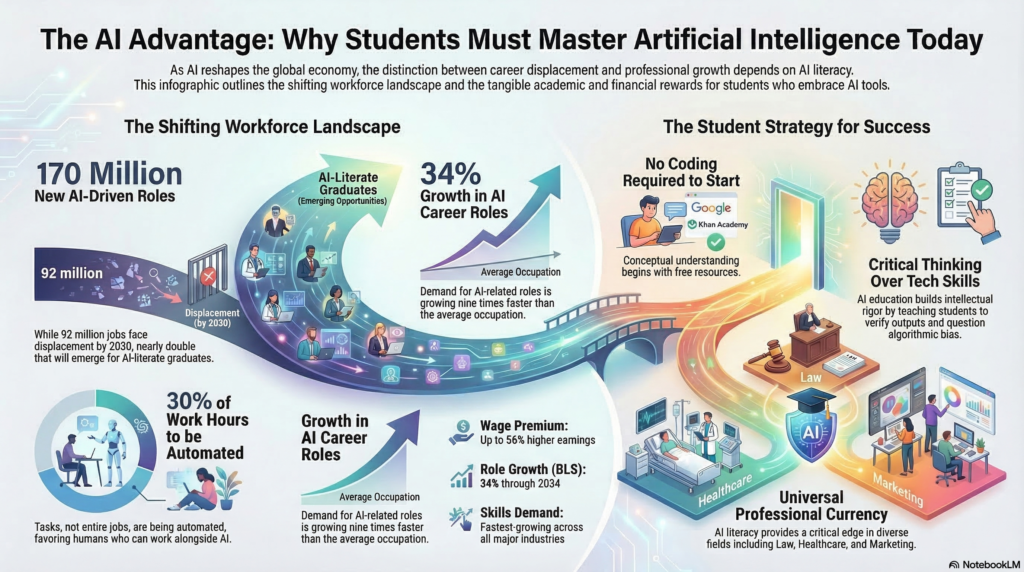
Whether you’re a student trying to do more with less time, a business owner wearing six hats at once, or an entrepreneur building something from scratch – AI has quietly become the great equalizer. The people pulling ahead aren’t necessarily more talented. They’re just better equipped.
This guide breaks down the best free AI tools available right now what they actually do, who they’re best for, and how to use them without touching a single line of code.
You Don’t Need to Understand AI to Use It
Let’s get something out of the way.
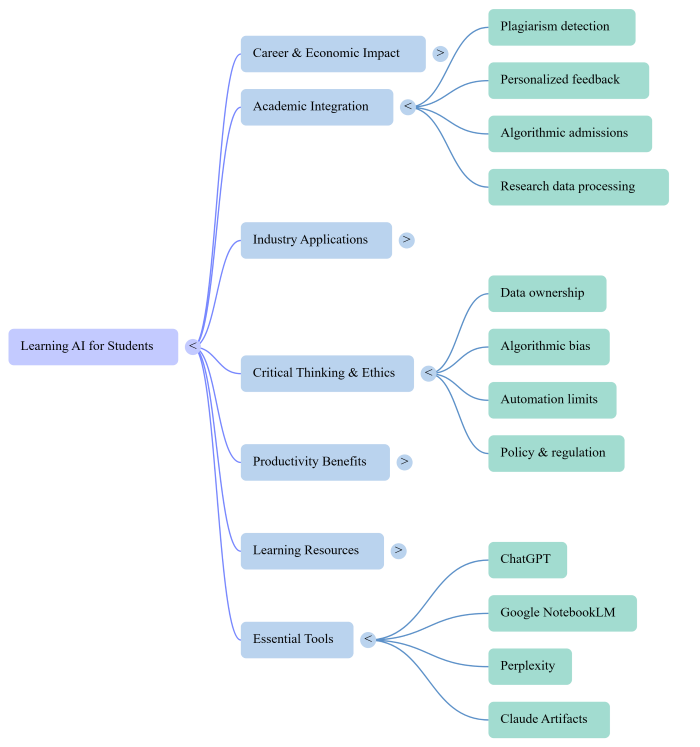
You don’t need a computer science degree. You don’t need to know what a large language model is. You don’t even need to be “good with technology.”
What you need is a clear problem and the right tool to solve it.
Think of AI tools the way you think about a calculator. You don’t understand the circuit board. You just know it handles the math faster than you can. These tools are the same. They handle the repetitive, time-consuming, cognitively draining parts of your work so you can focus on the parts only you can do.
For a student, that might mean turning a week of research into a structured outline in 20 minutes. For a small business owner, it could mean having professional-quality social media content without hiring an agency. For an entrepreneur, it might mean writing investor emails that actually get opened.
The tools below are free, proven, and built for people who just want results.
1. Writing, Thinking & Communication
ChatGPT (Free tier OpenAI)
ChatGPT is the most widely adopted AI assistant in the world for good reason. The free version runs on GPT-4o Mini and handles an enormous range of tasks drafting emails, summarizing documents, brainstorming ideas, writing social captions, answering complex questions, and more.
Where it genuinely shines for non-tech users: you talk to it like a person. Type what you need in plain English. It figures out the rest.
If you’re a student writing a research paper, use it to stress-test your arguments ask it to play devil’s advocate on your thesis. If you’re a business owner, use it to draft your first version of anything: a proposal, a job description, a customer FAQ. First drafts are where most people lose the most time ChatGPT gives that time back.
Best for: Writing assistance, research, brainstorming, customer communication drafts
Claude (Free tier Anthropic)
Claude is ChatGPT’s quieter, often sharper sibling. Where ChatGPT casts wide, Claude tends to go deep. It’s particularly strong at handling long documents you can paste in an entire business plan or report and ask it to analyze, summarize, or critique it.
Entrepreneurs who are working through complex decisions pricing strategy, positioning, messaging often find Claude’s reasoning more nuanced. It pushes back thoughtfully rather than just agreeing with whatever you said.
The free tier is genuinely usable. Not a stripped-down demo.
Best for: Document analysis, strategic thinking, long-form content, nuanced feedback
Grammarly (Free tier)
Grammarly has been around long enough that people forget how good it’s become. The free version catches grammar, spelling, clarity issues, and tone and it integrates directly into your browser, Google Docs, and email.
For non-native English speakers or anyone who communicates professionally in writing which is almost everyone this is non-negotiable. It tells you when your sentence is too passive, when your tone reads as aggressive, when your paragraph is too dense to hold attention.
One underrated use: paste a cold outreach email into Grammarly before sending. The tone detector alone has saved countless professional relationships.
Best for: Professional writing, email, client communication, academic writing
2. Visual Content & Design
Canva (Free tier)
Canva is what happens when a design tool decides everyone deserves to look professional. The free version includes thousands of templates for social media posts, presentations, flyers, resumes, pitch decks, and more.
The AI features built into Canva’s free tier background remover, Magic Write for copy suggestions, text-to-image have made it significantly more powerful in 2026 than it was even two years ago.
If you’re a student building a portfolio, a business owner creating marketing materials, or an entrepreneur preparing a pitch Canva removes the bottleneck between your idea and a finished visual. No designer needed.
Best for: Social media content, presentations, marketing materials, brand assets
Adobe Express (Free tier)
Adobe Express sits slightly above Canva in polish for certain use cases particularly if you’re working with video content or need brand consistency across formats. The free tier includes AI-generated image tools, video editing basics, and one-click resizing across platforms.
For entrepreneurs running lean operations, this is worth having alongside Canva rather than instead of it. Different tools win on different projects.
Best for: Short-form video, branded content, social media graphics
3. Productivity & Organization
Notion AI (Free with limitations)
Notion is a workspace notes, databases, project management, wikis and its AI layer makes it significantly more useful for people managing complexity without a team.
Ask Notion AI to summarize a meeting note, generate a project plan from a brief description, or turn a messy brain dump into structured action items. For entrepreneurs juggling multiple moving parts, this kind of structured thinking support is worth more than it sounds.
Best for: Project management, knowledge organization, content planning, team wikis
Otter.ai (Free tier)
Meetings eat time. Otter.ai records, transcribes, and summarizes them automatically. The free tier gives you 300 minutes of transcription per month, which covers most people’s meeting load.
For students doing research interviews, business owners running client calls, or entrepreneurs pitching to investors never lose a detail again. More practically: stop taking notes during meetings and start actually listening.
Best for: Meeting transcription, interview notes, lecture capture, client calls
4. Research & Learning
Perplexity AI (Free tier)
Perplexity is what Google Search would look like if it actually answered your question instead of showing you ten links to figure out yourself. Type a question, get a direct answer with sources cited inline so you can verify everything.
For students doing research, this is a serious time-saver. For business owners making decisions market research, competitor analysis, industry trends it surfaces information fast. The difference between Perplexity and ChatGPT: Perplexity pulls from the live web. If recency matters, use Perplexity.
Best for: Research, market intelligence, fact-checking, quick learning
5. Gemini Notebook (Free Google)
Previously NotebookLM but now Gemini Notebook is one of the most underrated free AI tools of 2026 – and Google built it specifically for people who work with a lot of source material.
Here’s what makes it different: you upload your documents – PDFs, Google Docs, research papers, notes and the AI works exclusively from that material. No hallucinations from the open web. No made-up sources. Just intelligent answers grounded in what you actually gave it.
For students, this is a research superpower. Upload your course readings and interrogate them like a study partner who’s read everything. For business owners and entrepreneurs, upload your market research, competitor reports, or internal docs and start asking questions your spreadsheet can’t answer.
It also generates audio summaries a feature that sounds gimmicky until you’re catching up on 40 pages of reading during a commute.
Best for: Students, researchers, anyone working with large volumes of documents or source material
The One Thing Most People Get Wrong About Free AI Tools
They try one tool. It doesn’t perfectly solve their problem. They conclude “AI isn’t for me.”
The reality is no single tool does everything. The professionals getting the most value from AI are using small combinations ChatGPT to draft, Grammarly to refine, Canva to visualize, Otter to capture.Each tool handles a specific friction point.
Start with one problem you’d like to solve faster. Find the tool that addresses it. Build from there.
According to landmark research from Stanford’s Digital Economy Lab, customer support workers who integrate AI tools into their workflows report an average productivity gain of 14%a number that jumps to 34% for newer workers. Meanwhile, a joint study by Harvard Business School and Boston Consulting Group (BCG) found that consultants using AI completed tasks 25.1% faster and produced work with over 40% higher quality. That’s not a rounding error. That’s what’s separating the people who feel behind from the ones who finally have breathing room.
You don’t need all of these tools. You need the right two or three for where you are right now.
FAQ Section
1. Are free AI tools actually good enough for professional use?
For most non-technical users, yes. Tools like ChatGPT, Claude, Canva, and Grammarly offer genuinely capable free tiers that handle the majority of everyday tasks writing, design, research, and organization. The paid versions unlock more volume and advanced features, but the free tiers are a solid starting point.
2. Do I need any technical skills to use these AI tools?
None. Every tool on this list was designed for people who are not developers. If you can type a sentence and click a button, you can use these tools effectively.
3. Which free AI tool should I start with if I’m a complete beginner?
Start with ChatGPT. It’s the most versatile, has the largest support community, and handles the widest range of tasks. Once you’ve gotten comfortable with how AI assistants work, branch out from there based on what you need most.
4. Are these AI tools safe to use for business information?
Use common sense with sensitive data. Avoid pasting confidential client information, financial data, or proprietary business details into any AI tool unless you’ve reviewed their data privacy policy. OpenAI’s privacy page and Anthropic’s privacy policy both outline how your data is handled.
5. Will AI tools replace my job?
The more useful question is will someone who uses AI tools outcompete someone who doesn’t? According to McKinsey’s 2025 AI report, AI is augmenting roles faster than eliminating them particularly for knowledge workers. Learning these tools now is professional development, not a threat response.
6. How do I know which AI tool is right for my specific need?
Match the tool to the task type. Writing and communication → ChatGPT or Claude. Visuals → Canva or Adobe Express. Research → Perplexity or NotebookLM. Transcription → Otter.ai. Organization → Notion. Start there and adjust as you learn what works for you.