Technical SEO is often the most rigorously tested area in SEO interviews, since it requires a mix of conceptual understanding and hands-on troubleshooting skill. Whether you’re a fresher building your foundation or an experienced professional aiming for a senior or lead role, interviewers want to see that you understand crawling, indexing, site architecture, and performance not just definitions, but how these pieces actually affect a real website.
This blog covers the Top 50 Technical SEO interview questions and answers, from foundational concepts to advanced troubleshooting scenarios. Every answer includes a short, practical example, and several include an Interview Tip to help you avoid common oversimplifications that can weaken an otherwise good answer.
Technical SEO Interview Questions Table of Contents
- Crawling & Indexing Basics
- Site Architecture & URL Questions
- Performance & Core Web Vitals
- Structured Data, Rendering & International SEO
- Advanced Technical SEO Questions
1. Crawling & Indexing Basics
1. What is Technical SEO?
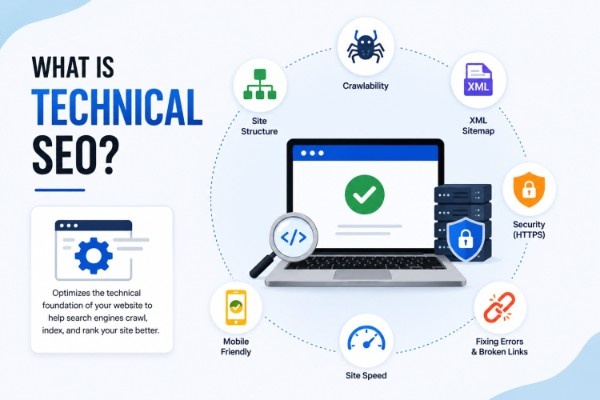
Answer: Technical SEO refers to optimizing a website’s infrastructure such as crawling, indexing, site speed, and structured data so that search engines can efficiently access, understand, and serve its content in search results.
For a deeper understanding of how these elements are evaluated together, learn what a Technical SEO audit is and explore Technical SEO best practices.
Example: Fixing broken internal links so search engine bots can properly reach all important pages.
2. What is crawling?
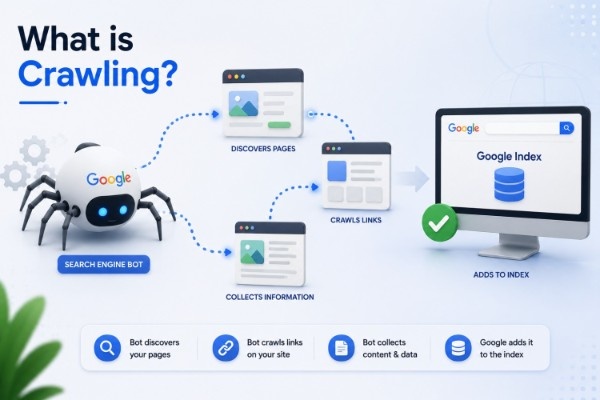
Answer: Crawling is the process by which search engine bots discover pages by following links, sitemaps, and other pathways across the web.
Example: Googlebot following an internal link from a homepage to a new blog post.
3. What is indexing?
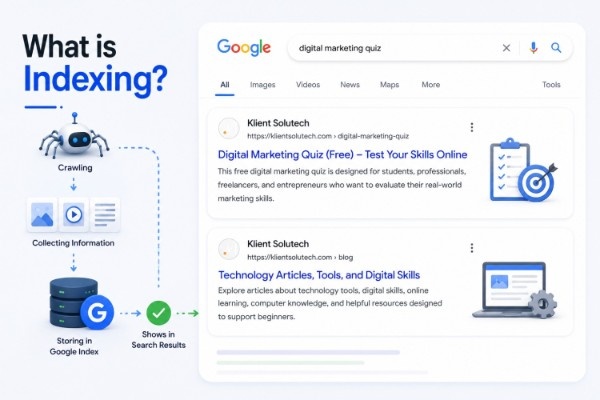
Answer: Indexing is the process of storing and organizing crawled pages in a search engine’s database, making them eligible to appear in search results. A page can be crawled without necessarily being indexed.
Example: A crawled page marked noindex won’t be stored in the search index even though it was visited by a bot.
4. What is a robots.txt file?
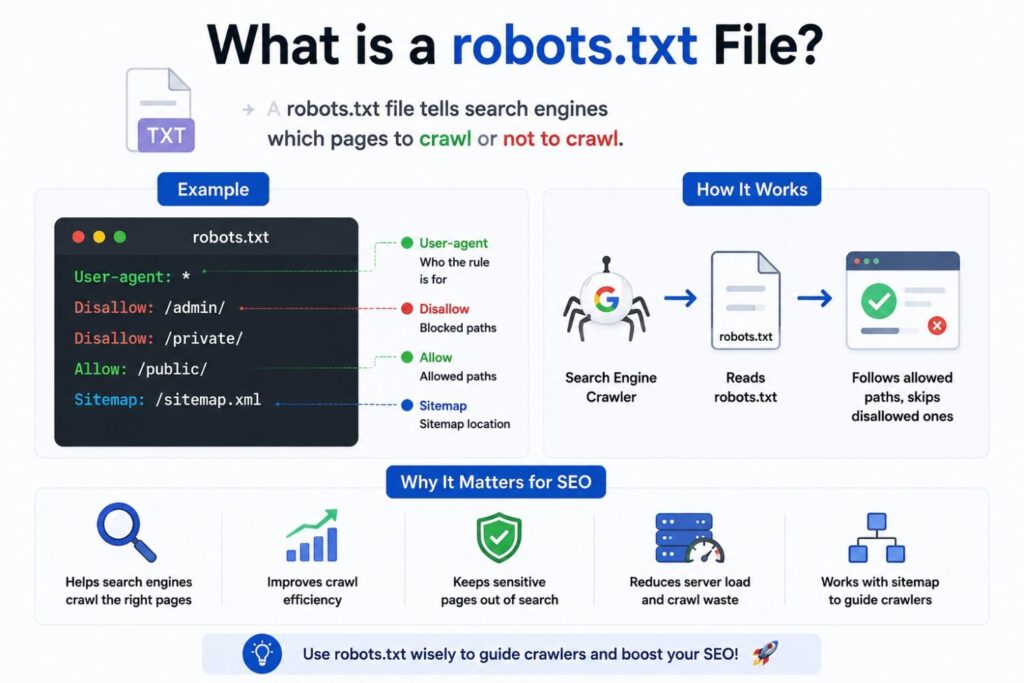
Answer: Robots.txt is a text file that gives crawlers instructions about which parts of a site they should or shouldn’t crawl. It manages crawling behavior but doesn’t guarantee a page will be excluded from indexing if it’s linked elsewhere.
Example: Disallowing crawlers from an internal search results directory to avoid wasting crawl activity there.
5. What is crawl budget?
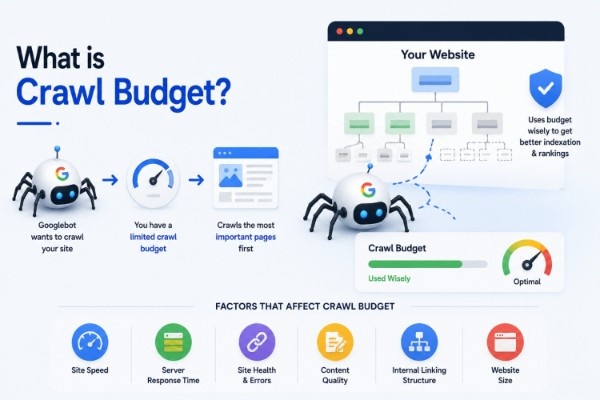
Answer: Crawl budget refers to the number of pages a search engine is willing and able to crawl on a site within a given timeframe, influenced by factors like site size, server capacity, and page popularity. It matters most for very large or frequently changing sites.
Example: A large e-commerce site prioritizing crawl budget toward in-stock products rather than outdated, discontinued listings.
6. What is the difference between crawling and rendering?
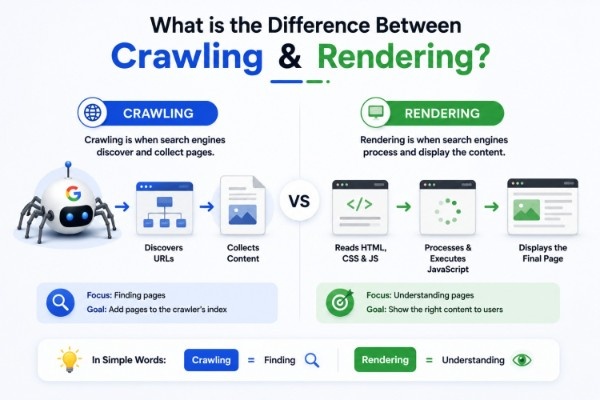
Answer: Crawling refers to fetching a page’s raw content, while rendering refers to processing that content (including JavaScript) to see the page as a user would. Some content only becomes visible after rendering.
Example: A page whose product prices load via JavaScript may require rendering before that content is visible to search engines.
7. What is indexability?
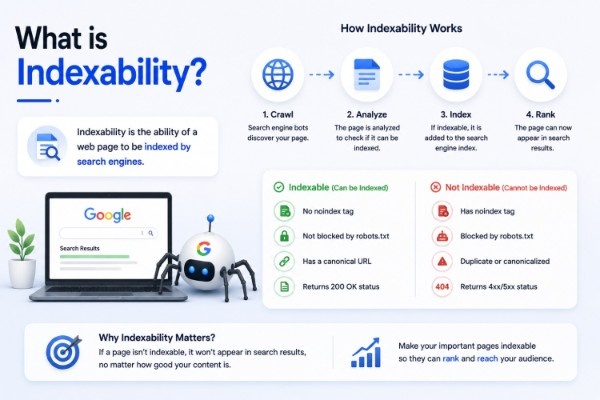
Answer: Indexability refers to whether a page is eligible to be stored in a search engine’s index, affected by factors like robots directives, canonicalization, and duplicate content signals.
Example: A duplicate filtered URL correctly marked noindex to keep it out of search results.
8. What is a robots meta tag and how does it differ from robots.txt?
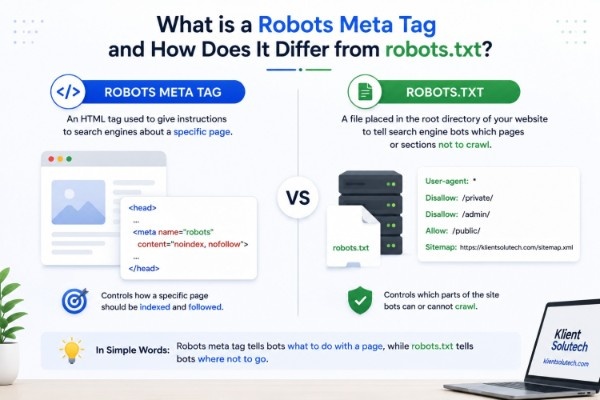
Answer: A robots meta tag is placed within a specific page’s HTML to control indexing and link-following for that page, while robots.txt applies crawling rules at a broader, site- or directory-level.
Example: Using a page-level noindex tag on a thank-you page, rather than blocking the whole checkout folder in robots.txt.
9. What are HTTP status codes and why do they matter for SEO?
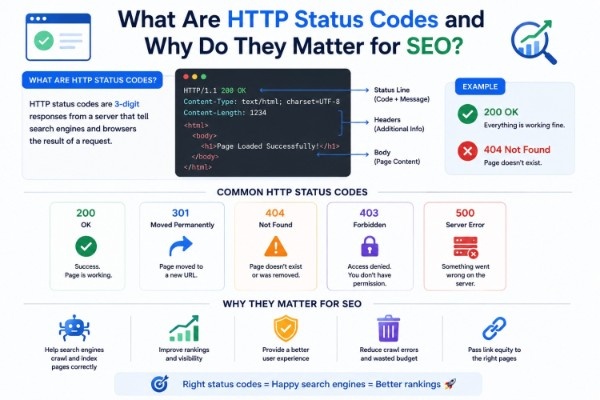
Answer: HTTP status codes indicate the result of a request to a server such as 200 (success), 301 (permanent redirect), 404 (not found), or 500 (server error) and help search engines and users understand a page’s availability.
Example: A page mistakenly returning a 200 status instead of 404 for a genuinely missing product.
10. What is a soft 404 error?
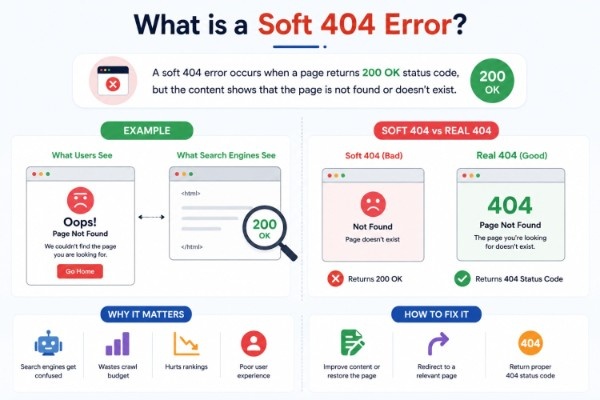
Answer: A soft 404 occurs when a page displays not found style content to users but still returns a 200 (success) status code instead of a proper 404, which can confuse search engines about the page’s actual status.
Example: A deleted product page showing Item not available text while still returning a 200 status.
2. Site Architecture & URL Questions
11. What is a canonical tag and why is it important?
Answer: A canonical tag tells search engines which version of similar or duplicate pages should be treated as the primary one, helping consolidate ranking signals rather than splitting them across near-identical URLs.
Example: Using a canonical tag on a URL with tracking parameters, pointing to the clean version of the page.
Interview Tip: Be clear that canonical tags are a signal, not a strict directive search engines can choose a different canonical if other signals strongly suggest otherwise.
12. What is duplicate content from a technical perspective?
Answer: Duplicate content refers to identical or highly similar content accessible through multiple URLs, often caused by URL parameters, session IDs, or printer-friendly versions, rather than always being intentional copying.
Example: The same page accessible via both example.com/page and example.com/page?ref=homepage.
13. What is a 301 redirect and when should it be used?
Answer: A 301 redirect indicates a permanent move from one URL to another, passing most ranking signals to the new destination. It’s used when content has permanently moved or a URL structure changes.
Example: Redirecting an old blog URL to a new, updated URL after a content restructure.
14. What is a 302 redirect and how does it differ from a 301?
Answer: A 302 redirect indicates a temporary move, signaling that the original URL should remain the canonical reference. Using 302 for permanent changes can create confusion about which URL should be indexed long-term.
Example: Temporarily redirecting users during a short site maintenance window using a 302 instead of a 301.
15. What is a redirect chain and why is it a problem?
Answer: A redirect chain occurs when a URL redirects to another URL that itself redirects again, potentially slowing page load and making it harder for crawlers to efficiently reach the final destination.
Example: URL A redirecting to URL B, which redirects to URL C, instead of A redirecting directly to C.
16. What is a redirect loop?
Answer: A redirect loop happens when a series of redirects eventually points back to an earlier URL in the chain, creating an endless cycle that prevents the page from ever loading.
Example: Page A redirecting to Page B, which mistakenly redirects back to Page A.
17. What is URL parameter handling and why does it matter?
Answer: URL parameters (like tracking or filter parameters) can create multiple URL variations of the same content. Managing them properly through canonicalization or careful internal linking helps prevent unnecessary duplicate content issues.
Example: A filtered product listing URL with ?color=blue being canonicalized to the main category page when appropriate.
18. What is faceted navigation and what technical challenges does it create?
Answer: Faceted navigation allows users to filter listings (like by size, color, or price), often generating large numbers of URL combinations. Without proper handling, this can create excessive duplicate or thin pages that strain crawl budget.
Example: An e-commerce site generating hundreds of filter-combination URLs, most of which shouldn’t be indexed.
19. What is an XML sitemap?
Answer: An XML sitemap is a file listing a website’s important URLs, helping search engines discover pages more efficiently, particularly for large sites, new sites, or pages with few internal links.
Example: Submitting an updated sitemap after a large batch of new product pages goes live.
20. What is a site’s URL structure and why does it matter technically?
Answer: URL structure refers to how a website’s URLs are organized, ideally reflecting a logical hierarchy that’s easy for both users and crawlers to understand and navigate.
Example: /shoes/running/mens clearly reflecting a category hierarchy, compared to a string of random parameters.
3. Performance & Core Web Vitals
21. What are Core Web Vitals?
Answer: Core Web Vitals are metrics used by Google to assess loading performance, interactivity, and visual stability. The current metrics are Largest Contentful Paint (LCP), Interaction to Next Paint (INP), and Cumulative Layout Shift (CLS).
Example: Reducing a page’s LCP by compressing a large hero image that loads slowly.
22. What is Largest Contentful Paint (LCP)?
Answer: LCP measures how long it takes for the largest visible content element on a page to load, reflecting perceived loading speed for users.
Example: A large banner image that takes several seconds to load can result in a poor LCP score.
23. What is Interaction to Next Paint (INP)?
Answer: INP measures the responsiveness of a page by evaluating the delay between a user’s interaction (like a click) and the page’s visual response, replacing the older First Input Delay (FID) metric.
Example: A button that takes a noticeable delay to respond after being clicked can result in a poor INP score.
24. What is Cumulative Layout Shift (CLS)?
Answer: CLS measures unexpected visual movement of page elements during loading, which can disrupt the user experience.
Example: An ad loading late and pushing the main content further down the page unexpectedly.
25. How can page speed be improved from a technical standpoint?
Answer: Common approaches include compressing images, minimizing unnecessary JavaScript and CSS, leveraging browser caching, and using a content delivery network (CDN) to reduce load times.
Example: Serving images in a modern compressed format instead of large, uncompressed files.
Page speed is one part of creating an SEO-friendly website, alongside crawlability, mobile usability, content structure, and other optimization factors.
26. What is lazy loading and how does it relate to performance?
Answer: Lazy loading defers the loading of non-critical resources, like below-the-fold images, until they’re needed, which can improve initial load times, though it should be implemented carefully to avoid harming Core Web Vitals metrics.
Example: Images further down a long article loading only as the user scrolls toward them.
27. What is a Content Delivery Network (CDN) and how does it help SEO?
Answer: A CDN distributes website content across multiple servers globally, reducing load times for users by serving content from a server closer to their location.
Example: A visitor in Asia loading a website faster because content is served from a nearby regional server rather than one on another continent.
28. What is server response time and why does it matter?
Answer: Server response time refers to how quickly a server begins responding to a browser’s request. Slow server response times can negatively affect both user experience and crawl efficiency.
Example: An overloaded server taking several seconds to respond, delaying the entire page load process.
29. What is HTTPS and what role does it play in Technical SEO?
Answer: HTTPS encrypts data transferred between a browser and server, providing a more secure connection. It’s considered a baseline trust signal, though its direct ranking impact is generally modest compared to content relevance and quality.
Example: A site migrating from HTTP to HTTPS to secure user data on login and checkout pages.
30. What is mixed content and why is it a technical issue?
Answer: Mixed content occurs when a HTTPS page loads some resources (like images or scripts) over an insecure HTTP connection, which can trigger browser security warnings and undermine the page’s overall security.
Example: A secure HTTPS page still loading an old image file from an HTTP URL.
4. Structured Data, Rendering & International SEO
31. What is structured data (schema markup)?
Answer: Structured data is code added to a page’s HTML that helps search engines understand its content more precisely, and may make eligible content available for supported rich results.
Example: Adding review schema to a product page so ratings can potentially appear in search results.
32. What is JSON-LD and why is it commonly recommended for structured data?
Answers: JSON-LD is a structured data format that’s added as a separate script block in a page’s HTML rather than embedded directly within visible content, making it easier to implement and maintain.
Example: Adding a JSON-LD script for organization details in a page’s header section.
33. What is JavaScript SEO?
Answer: JavaScript SEO refers to ensuring that content rendered through JavaScript is accessible, crawlable, and indexable by search engines, since JavaScript-heavy pages sometimes require additional rendering steps to reveal their full content.
Example: Verifying that product descriptions loaded via JavaScript are visible in a rendered version of the page, not just the raw HTML.
Interview Tip: Avoid saying “Google can’t read JavaScript modern search engines can render JavaScript, but rendering can be delayed or resource-intensive, which is the more accurate framing.
34. What is server-side rendering (SSR) versus client-side rendering (CSR)?
Answer: SSR generates a fully-formed HTML page on the server before sending it to the browser, while CSR relies on JavaScript executing in the browser to build the page’s content. SSR (or hybrid approaches) can make content more immediately accessible to crawlers. Modern frameworks often use hybrid rendering approaches, combining server-side and client-side rendering depending on the page.
Example: A CSR-heavy site adopting server-side rendering to ensure product content is visible without waiting for JavaScript execution.
35. What is hreflang and what problem does it solve?
Answer: Hreflang is an HTML attribute used to indicate the language and regional targeting of a page, helping search engines serve the correct version of content to users in different locations or languages.
Example: A site with separate English and French versions using hreflang tags so French users see the French version in search results.
36. What is international SEO and how does it relate to Technical SEO?
Answers: International SEO involves optimizing a website to be discoverable and properly served across different countries and languages, often using tools like hreflang, appropriate URL structures (subdirectories, subdomains, or ccTLDs), and localized content.
Example: A global brand using subdirectories like /en-us/ and /en-gb/ for different English-speaking markets.
37. What is a log file and how is log file analysis used in Technical SEO?
Answer: A log file records every request made to a server, including crawler visits. Log file analysis helps identify how search engines are actually crawling a site, revealing wasted crawl activity or important pages being under-crawled.
Example: Discovering through log files that a bot is repeatedly crawling low-value filtered URLs instead of key product pages.
38. What is an orphan page from a technical standpoint?
Answer: An orphan page has no internal links pointing to it, making it harder for crawlers and users to discover, even if the page technically exists and could otherwise rank.
Example: An old landing page still live on the server but removed from the site’s navigation and internal linking structure.
39. What is a site migration and what technical risks does it carry?
Answer: A site migration involves significant changes like a domain change, URL restructuring, or platform switch. Poorly managed migrations can lead to lost rankings if redirects, canonical tags, and internal links aren’t properly updated.
Example: Migrating to a new URL structure without setting up 301 redirects from the old URLs, causing broken links and lost rankings. Always test redirects before launch and monitor Search Console after migration.
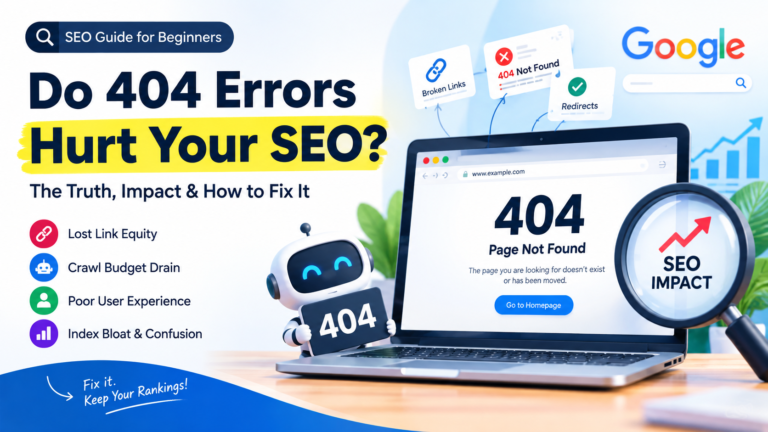
40. What is a 404 error and how should it be handled technically?
Answer: A 404 error indicates a page cannot be found. Legitimate 404s are a normal part of a healthy site, but a well-designed 404 page and appropriate redirects for pages that moved can improve user experience and reduce lost link value.
Example: Redirecting a deleted product page to a relevant category page instead of leaving visitors on a dead-end 404.
5. Advanced Technical SEO Questions
41. What is the difference between crawl budget optimization and indexing optimization?
Answer: Crawl budget optimization focuses on ensuring crawlers spend their limited crawling activity on valuable pages, while indexing optimization focuses on ensuring the right pages are eligible to appear in search results. They’re related but address different parts of the process.
Example: Blocking low-value parameterized URLs in robots.txt (crawl budget) versus using canonical tags to consolidate duplicate content (indexing).
42. What is a canonical mismatch and why is it a problem?
Answer: A canonical mismatch occurs when signals about a page’s preferred version conflict for example, a canonical tag pointing to one URL while internal links or a sitemap reference a different URL creating confusion for search engines.
Example: A canonical tag pointing to a non-www version while internal links consistently point to the www version.
43. What is pagination and how should it be handled technically?
Answer: Pagination involves splitting long content or listings (like product categories) across multiple URLs. Each useful paginated page can generally remain self-canonical, with clear, crawlable internal links connecting the series.
Example: A category with several pages of products, each accessible and self-canonical rather than all pointing back to page one.
44. What is the role of internal linking in Technical SEO?
Answer: Internal linking helps distribute crawl paths and authority across a site, supports discovery of important pages, and clarifies site hierarchy for both users and search engines.
Example: Linking a new blog post from a relevant high-traffic pillar page shortly after publishing.
Internal linking is also an important part of On-Page SEO best practices, helping search engines discover content while giving users a clearer path through related pages.
45. What is a broken link and why does it matter technically?
Answer: A broken link points to a page that no longer exists or returns an error, disrupting both user navigation and crawl paths, and potentially wasting crawl activity on dead ends.
Example: An internal link pointing to a product page that was removed without a redirect in place.
46. What is page experience and how does it relate to Technical SEO?
Answer: Page experience refers broadly to how usable and satisfying a webpage is for visitors. Factors such as Core Web Vitals, secure delivery, and mobile usability can contribute to a better experience, but Google does not use a single standalone “page experience” ranking signal.
Example: Improving both load speed and mobile usability together rather than treating them as unrelated fixes.
47. What is mobile-first indexing?
Answers: Mobile-first indexing means Google primarily uses the mobile version of a site’s content for indexing and ranking, making it important that mobile pages contain the same important content, links, and structured data as their desktop counterparts.
Example: Ensuring a mobile page includes the same product descriptions and structured data as the desktop version, not a stripped-down version.
48. What is a noindex tag and how is it different from disallowing a page in robots.txt?
Answer: A noindex tag tells search engines not to include a specific page in the index, while still allowing it to be crawled. Disallowing a page in robots.txt prevents crawling altogether, which means a noindex tag on that page may never actually be seen by crawlers.
Example: A page mistakenly disallowed in robots.txt while also carrying a noindex tag that search engines never get to read.
Interview Tip: This is a common trick question clarify that combining disallow and noindex on the same page can backfire, since crawlers can’t see the noindex tag if they’re blocked from crawling.
49. How would you audit a website’s crawlability and indexability?
Answer: A typical audit reviews robots.txt rules, XML sitemaps, canonical tags, redirect chains, status codes, internal linking structure, and index coverage reports to identify pages that aren’t being crawled or indexed as intended.
Example: Using a crawler tool alongside Search Console’s index coverage report to find pages excluded due to canonicalization or noindex tags.
Identifying these problems early can also help you fix common SEO mistakes before they begin affecting crawling, indexing, or organic visibility.
50. What’s your process for diagnosing a sudden drop in organic traffic from a technical perspective?
Answer: A structured approach typically involves checking for recent site changes, verifying indexability and crawl errors, reviewing redirect and status code issues, confirming Core Web Vitals haven’t regressed, and cross-referencing with Search Console data before assuming a ranking or algorithmic cause. Also verify whether the traffic drop aligns with a confirmed Google Search update or only affects your own site.
Example: Discovering that a recent site update accidentally added a sitewide noindex tag, explaining a sudden traffic drop.
Final Tips for the Interview
- Be ready to explain concepts in plain language first, then add technical depth if asked to go deeper.
- Practice walking through a real troubleshooting scenario (like a traffic drop or indexing issue) step by step.
- Get comfortable with tools like Google Search Console, a crawler (like Screaming Frog), and basic log file analysis.
- Avoid absolute claims about ranking factors frame contributions as part of a broader set of signals rather than standalone guarantees.
Preparing for a broader SEO role? Review these On-Page SEO interview questions and answers to strengthen your understanding of content and page-level optimization.
Put Your Digital Marketing Skills to the Test
Technical SEO is only one part of a complete digital marketing skill set. Challenge yourself with our Digital Marketing Quiz and see how well you understand SEO, content marketing, social media, PPC, and other key concepts.